Every TypeScript developer knows the ritual. npx create-next-app, answer a few questions about TypeScript and Tailwind, and you have a working project structure in under a minute. The framework is wired up. The config files are in place. You can write code immediately.
Starting a Go project from scratch does not work that way. You have go mod init and an empty main.go, and then a sequence of decisions: which router, which database driver, how to structure packages, where to put the server setup, how to wire in Docker, whether to use Air for hot reload. Community estimates put that manual overhead at 17 to 33 hours per new service. That is before you have written a single line of business logic.
go-blueprint collapses that to minutes.
01. WHAT IT DOES
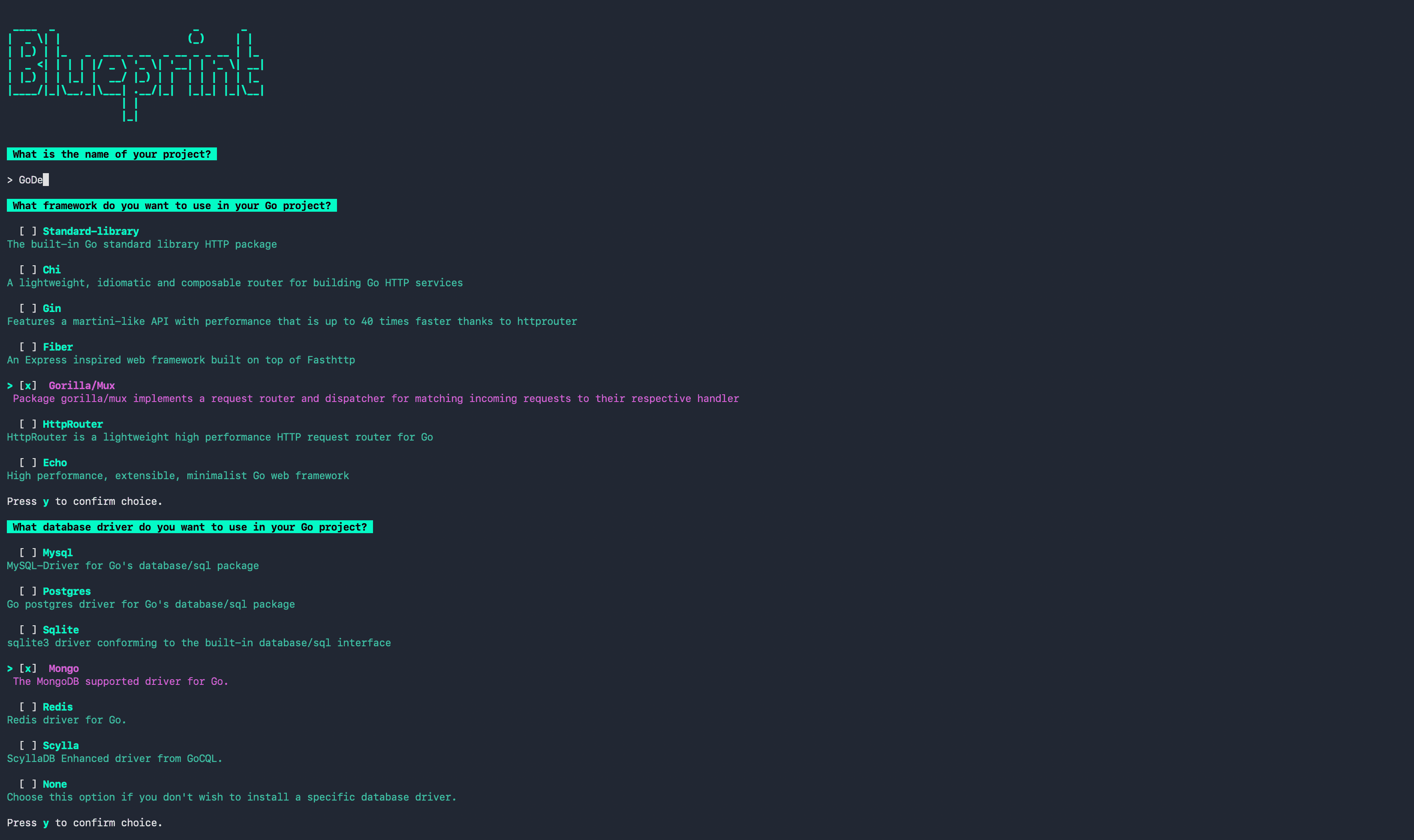
go-blueprint is a CLI scaffolding tool that generates a production-ready Go project structure from a single command. Pick a framework, a database driver, and a set of optional features, and you get a project that compiles, connects, and handles HTTP requests out of the box.
Installation is available three ways. The npm path is deliberate: it exists specifically for JavaScript developers who may not have $GOPATH configured yet.
# If you have Go installed
go install github.com/melkeydev/go-blueprint@latest

# If you are coming from the JS ecosystem
npm install -g @melkeydev/go-blueprint

# If you use Homebrew
brew install go-blueprint
Running go-blueprint create without flags launches an interactive TUI that walks through every option. Fully non-interactive:
go-blueprint create \
  --name my-api \
  --framework chi \
  --driver postgres \
  --advanced \
  --feature docker \
  --feature githubaction \
  --git commit
02. WHAT GETS GENERATED
The base structure is consistent across all configurations:
my-api/
├── .github/
│   └── workflows/
│       ├── go-test.yml
│       └── release.yml
├── cmd/
│   └── api/
│       └── main.go
├── internal/
│   ├── database/
│   │   ├── database.go
│   │   └── database_test.go
│   └── server/
│       ├── server.go
│       ├── routes.go
│       └── routes_test.go
├── .air.toml
├── docker-compose.yml
├── Dockerfile
├── go.mod
├── Makefile
└── README.md
The package layout follows Go conventions: cmd/ for the entrypoint, internal/ for packages that should not be imported externally. The database.go file includes connection setup, a ping-based health check, and environment variable loading. The routes.go file has the framework wired up and ready for your first route. Air is configured for hot reload. The Makefile includes targets for running, building, testing, and linting.
The generated code is intentionally minimal. There is no deep framework abstraction layer, no opaque generated boilerplate. You can read every file and understand exactly what it does.
03. FRAMEWORK AND DATABASE OPTIONS
Seven router options are supported:
| Framework | Character |
|---|---|
| Chi | Lightweight, composable middleware, idiomatic Go |
| Gin | Most popular Go web framework, fast |
| Fiber | Express-inspired, built on fasthttp |
| Echo | High-performance with built-in middleware |
| Gorilla/mux | Classic, battle-tested |
| HttpRouter | Minimalist radix-tree router |
| net/http | Standard library only, zero dependencies |
Database drivers: PostgreSQL, MySQL, SQLite, MongoDB, Redis, and ScyllaDB via GoCQL.
Advanced features via --feature: HTMX with Templ templates, GitHub Actions pipelines, WebSocket setup, Tailwind, Docker, and a React frontend option. The React option generates a full TypeScript Vite frontend alongside the Go backend. For TypeScript developers wanting a Go API without abandoning the frontend tooling they know, this is a useful starting point.
04. BLUEPRINT UI
The web interface at go-blueprint.dev lets you compose your project configuration visually. Toggle framework, database, and features via dropdowns and checkboxes, watch the file tree preview update in real time, and copy the exact CLI command to run. This is the equivalent of Next.js's create-next-app web playground: a low-friction way to explore what you will get before committing to running anything.
05. THE CREATOR
go-blueprint was built by Melkey, a Senior ML Infrastructure Engineer at Twitch who has been writing Go professionally for several years. He streams live coding at twitch.tv/melkey and teaches on Frontend Masters: a complete Go for professional developers course and a follow-up on building Go applications that scale on AWS.
The creator profile matters for understanding why the tool exists. Melkey bridges the gap between JavaScript ecosystem thinking and idiomatic Go. He is familiar with create-react-app, with npm publish, with build tooling that prioritizes developer experience. go-blueprint was partly a teaching tool, partly a community utility. The npm install path, the Blueprint UI web app, the React frontend option: these are all nods to developers who are coming from the JavaScript world and need a lower-friction entry point into Go.
The project is listed in awesome-go, has roughly 8,800 GitHub stars, and is actively maintained with regular releases.
06. HOW IT COMPARES TO STARTING FROM SCRATCH
The honest comparison is not about what go-blueprint generates versus what you could write by hand. A senior Go developer can set up a clean project structure in a couple of hours. The comparison is about what you skip: the research time, the framework evaluation, the decision fatigue about package layout conventions, the Docker Compose boilerplate you have written a dozen times before.
go-blueprint's value is the same as any scaffolding tool: it handles the decisions that have already been made well enough so that your first commit contains something meaningful rather than infrastructure setup.
The source is at Melkeydev/go-blueprint, MIT licensed.